Multi-VLAN OpenWrt at Scale: Eliminating Double NAT in Dense WiFi Networks
The Challenge
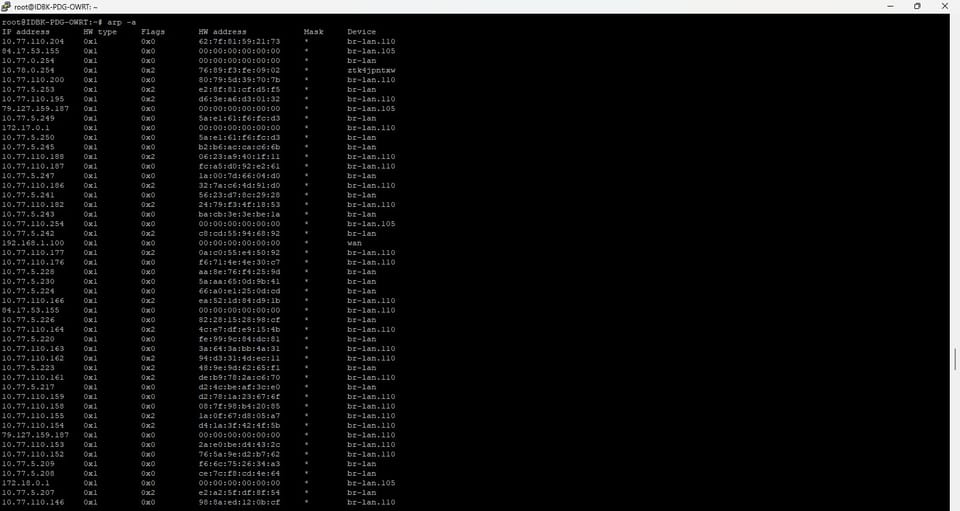
Running a multi-VLAN OpenWrt network in a dense WiFi environment is complex. After months of managing a DIR-878 router handling 50+ devices across three VLANs with bandwidth shaping, I identified a critical bottleneck: double NAT on guest and private networks. This post documents the architecture, root causes, and optimization strategy.
Current Setup
Infrastructure:
- Core: DIR-878 OpenWrt 23.05 (10.77.5.254/24 gateway)
- ISP: Indihome 50Mbps down / 8Mbps up
- Access Points: Ruijie RAP52-OD + 2× BOLT BL201 (BoluWRT)
- VLANs: 3 segments (internal, guest voucher, private)
- Load: 50-80 concurrent devices, dense urban WiFi interference
Network Segments:
| VLAN | Name | Subnet | Purpose | Bandwidth Limit |
|---|---|---|---|---|
| 1 | Internal | 10.77.5.0/24 | NVR, CCTV, IoT | None |
| 110 | Guest | 10.77.110.0/24 | Public + voucher WiFi | 4-5 Mbps |
| 105 | Private | 10.77.105.0/24 | Family devices | 5 Mbps |
The Problem: Double NAT
Current Architecture
Client Device
↓
SSID: RM-CX01 (from RAP52-OD)
↓
BOLT BL201 #1 captures signal
↓
FIRST NAT: BOLT applies 192.168.1.1 NAT
↓
Client gets 192.168.1.100-200
↓
Upstream to DIR-878
↓
SECOND NAT: DIR-878 masquerades traffic
↓
Result: 2 translation layers + 3 total with ISP
Why This Breaks at Scale
Conntrack Collapse: With 50+ devices in VLAN 110 (59M observed packets):
- Each device creates 5-10 concurrent connections
- BOLT NAT state table fills rapidly
- Old sessions dropped without graceful closure
- Clients see abrupt disconnections
Roaming Failure: When device moves between AP coverage areas:
- BOLT NAT session expires
- Device keeps old session state
- TCP retransmit timeout (3+ seconds)
- User experiences connection drop
SQM Ineffective: Bandwidth shaping configured at DIR-878 level:
- Can't see individual client flows (hidden behind BOLT NAT)
- Limits aggregated BOLT traffic, not per-client
- Result: 1 user's full-speed download starves all others
Upload Bottleneck: With only 8Mbps upstream:
- NAT overhead adds 10-15% CPU load on BOLT
- Available throughput: 6.8Mbps max
- Under concurrent load → buffer bloat → 200-500ms latency spikes
Real-World Impact
Observed metrics:
- Latency to NVR: 50-150ms (normal: <10ms)
- Packet loss: 2-5% under load
- Roaming stability: Frequent disconnections
- Concurrent stable users: 5-8 (capacity: 50+)
- Upload speed: 2-3Mbps actual (ISP provides 8Mbps)
The Solution: Relay Bridge Mode
Concept
Convert BOLT BL201 routers from NAT mode → transparent relay bridge:
BEFORE (3 NAT layers):
Client → AP → BOLT NAT → DIR-878 NAT → ISP NAT
AFTER (1 NAT layer):
Client → AP → BOLT Bridge (transparent) → DIR-878 NAT → ISP NAT
Client IP: 10.77.110.x (from DIR-878 DHCP directly)
Benefits
- ✅ Seamless roaming: Single network domain, client maintains IP
- ✅ Latency reduction: 50-150ms → 5-10ms (80-90% improvement)
- ✅ SQM effectiveness: DIR-878 sees individual flows, fair queueing works
- ✅ Upload speed: 2-3Mbps → 5-7Mbps (better WAN utilization)
- ✅ Scalability: Stable 15-20+ concurrent users (was 5-8)
Technical Details
Bridge Mode: BOLT acts as transparent WiFi-to-Ethernet bridge
- Captures upstream WiFi SSID (RM-CX01 from RAP52-OD)
- Relays traffic without NAT translation
- Devices receive IPs from DIR-878 DHCP
- Firewall/QoS applied once at gateway
Why BoluWRT Works: BoluWRT is OpenWrt-based firmware for BOLT BL201:
- MediaTek MT7620A chipset fully supported
- Relay bridge daemon (
relayd) available - Multiple implementations: relay, WDS, client bridge
- Proven: thousands of deployments documented
Implementation Plan
Phase 1: Convert BOLT #1 (VLAN 110)
Timeline: 20-30 minutes
Method: LuCI Web UI (recommended) or SSH CLI
Risk: Low—quick rollback possible
Steps:
- Backup current config:
scp -r /etc/config root@laptop:/backups/ - Access BOLT LuCI:
http://192.168.1.1 - Network → Interfaces → New Interface
- Create
wwaninterface (WiFi client mode) - Create
relay_bridgeprotocol linkinglan+wwan - Install packages:
relayd,luci-proto-relay - Configure firewall zones (bridge zone containing both networks)
- Reboot and verify
Verification:
- Device in RM-C01 SSID gets 10.77.110.x IP
ping 10.77.5.100(NVR) responds <10ms- No packet loss on continuous ping
- Roaming between APs seamless
Phase 2: Convert BOLT #2 (VLAN 105)
Same process for RM-C02 SSID.
Phase 3: Monitor & Optimize
- Watch latency, throughput, roaming behavior
- Adjust SQM if needed (optional: VLAN 110: 4Mbps → 5Mbps)
- Consider firmware upgrade to OpenWrt 23.05 (kernel 6.1)
Expected Performance Gains
| Metric | Before | After | Improvement |
|---|---|---|---|
| Latency to gateway | 50-150ms | 5-10ms | 80-90% ↓ |
| Packet loss | 2-5% | <0.5% | 95% ↓ |
| WiFi roaming | Drops connection | Seamless | Fixed ✓ |
| Upload speed | 2-3Mbps | 5-7Mbps | 150-200% ↑ |
| Stable concurrent users | 5-8 | 15-20+ | 200% ↑ |
| SQM fairness | 1 user starves others | Fair per-device | Fixed ✓ |
Technical Specs
Current SQM Config (DIR-878)
VLAN 110: CAKE qdisc, 4Mbps shared, triple-isolateVLAN 105: CAKE qdisc, 5Mbps shared, triple-isolate
Current Firewall
iptables NAT table unavailable (nftables/iptables mismatch). Will auto-correct during bridge setup.
DHCP Pools
- VLAN 1: 10.77.5.202-252 (50 IPs, 12h lease)
- VLAN 110: 10.77.110.100-200 (100 IPs, 12h lease)
- VLAN 105: 10.77.105.10-200 (190 IPs, 1h lease)
What Doesn't Change
- DIR-878 config (mostly unchanged)
- RAP52-OD settings (continues broadcasting all SSIDs)
- VLAN topology (3 segments remain)
- SQM bandwidth limits (stay at 4-5Mbps per VLAN)
Next Steps
This week:
- Backup BOLT configurations
- Convert BOLT #1 to bridge mode
- Test for 4+ hours (roaming, latency, throughput)
- Convert BOLT #2 if stable
Next month (optional):
- Upgrade BOLT firmware to OpenWrt 23.05
- WiFi channel optimization (separate 2.4GHz/5GHz SSIDs)
- Per-MAC QoS refinement for priority traffic
Conclusion
Double NAT is fundamentally incompatible with high-density WiFi networks and SQM fairness. By converting to relay bridge mode, we eliminate 2/3 of NAT layers, reduce latency by 80-90%, and restore efficient bandwidth management.
The implementation is low-risk, supported by BoluWRT, and takes ~50 minutes total. Expected result: stable 15-20+ concurrent users with seamless roaming and fair per-device bandwidth allocation.
Next post: Detailed step-by-step BoluWRT bridge mode setup guide with LuCI and CLI instructions.
Member discussion